Home safety stays high on the list for many families today. People seek simple ways to check visitors, guard loved ones, and manage entry points with ease. A smart security setup can bring comfort and calm into daily life.
A Video Intercom System lets homeowners spot and greet visitors before they open the door. It also helps families control access in flats, landed homes, and gated properties. With many choices in the market, buyers need clear guidance before installation. This guide shares the key features, placement tips, and useful points that can help you pick the right system for your home.
Why Families Choose Home Intercoms
Many families want peace and control at home. A home intercom helps you check each guest before you open the door. It can stop strangers from entering your space. In many homes, children and older family members stay alone for parts of the day. Because of this, quick visitor checks matter.
Main Benefits
- Clear face and voice checks
- Fast talk with guests
- Gate control from indoors
- Strong support for home safety
- Simple use for each family member
A modern intercom system in Singapore also helps families handle deliveries with ease. You can speak with the delivery staff without rushing to the gate. As a result, daily routines feel smoother and safer.
Check Camera Quality Before Purchase
The camera stands as the heart of the unit. A weak camera gives dull images. In contrast, a sharp camera shows faces with ease. Night vision matters as well since many visitors arrive after sunset.
Look for These Features
- HD video display
- Wide viewing angle
- Night vision support
- Rain and dust shield
- Clear image under bright light
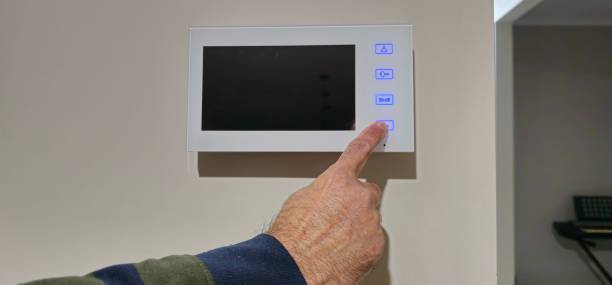
A good screen inside the house helps each family member read faces with ease. Large icons and clean menus make use simple.
Why Wide-Angle Cameras Matter
A narrow camera view can miss people who stand near the edge of the gate. However, a wide-angle lens captures more space around the entrance. This feature helps you spot extra visitors, parked vehicles, or dropped packages.
Pick the Right Audio System
Sound quality shapes each talk at the door. Crackling voices can spark stress and confusion. So, test the speaker and microphone before installation.
Audio Points That Matter
- Loud speaker output
- Sharp voice pickup
- Noise control support
- Stable signal range
Some homes hold thick walls or large gates. Because of this, weak sound systems may fail across long gaps.
Two-Way Communication Helps Daily Life
Clear two-way audio allows smooth talks with guests, workers, or neighbours. You can give directions, answer questions, or refuse entry without stepping outside. Therefore, the system saves time while adding comfort.
Think About Wiring and Placement
Placement can shape daily use. A poor spot may block the camera view or weaken sound. So, place the outdoor unit near the main gate with a clear line of sight.
Good Placement Tips
- Keep the camera near face height
- Avoid direct sunlight on the screen
- Protect wires from rain
- Place indoor screens near key rooms
Some homes suit wireless units, while others need wired systems for stable links. A skilled installer can inspect your layout and guide the process.
Wired vs Wireless Systems
Both options carry strengths. Wired systems often deliver stable signals and steady power. Yet, wireless models allow quicker setup and less drilling work.
Wired Systems
- Stable video quality
- Strong signal connection
- Lower risk of interference
Wireless Systems
- Faster installation
- Cleaner wall finish
- Flexible screen placement
Choose the option that fits your home structure and daily needs.
Understand Smart Features
Modern systems offer more than voice and video. Some units connect with phones and smart locks. As a result, you can speak with visitors while away from home.
Still, avoid features that bring little value to your daily routine. Focus on tools that fit your home and family needs.
Useful Smart Functions
- Mobile phone access
- Motion alerts
- Visitor image storage
Many buyers search for intercom systems in Singapore options with smart controls because city homes often need quick access tools and strong gate safety.
Remote Access Adds Convenience
Remote access allows you to answer the door while at work or during travel. You can also monitor home activity during holidays. Therefore, this feature supports both safety and peace of mind.
Focus on Ease of Use
A complex video intercom system buying guide system can frustrate family members. Children and older adults may struggle with small buttons or crowded menus. Therefore, choose a unit with clear controls and simple layouts.
Signs of a User-Friendly System
- Large screen icons
- Easy touch controls
- Clear menu structure
Simple designs improve daily use and reduce confusion.
Read Reviews and Product Guides
A product guide can reveal key facts before purchase. Reviews from real users can expose weak points that sales pages may hide. Therefore, take time to compare features, controls, and support terms.
Many families use a video intercom system buying guide before purchase, since it helps them avoid poor choices and confusing features.
What Reviews Can Reveal
Reviews often highlight:
- Sound quality issues
- Screen durability
- Ease of installation
Reading feedback from users can support better decisions.
Final Thoughts
Picking the right home security setup takes careful thought and clear planning. Families should examine camera quality, sound clarity, smart tools, and installation needs before they make a final choice. A system that fits your home layout can strengthen both safety and daily comfort.
A Video Intercom System gives homeowners stronger control over who enters the property while helping them speak with visitors with ease. With the right features and simple care, the system can serve your family for many years. Take time to compare options and choose features that bring long-term value before installation.
FAQs
1. Can a home intercom handle rough weather?
Yes, many outdoor units fight against rain, heat, and dust with ease. Strong outer covers help the system stay steady through changing weather. Regular cleaning and quick checks can also stretch the life of the unit.
2. Should families choose wireless or wired setups?
Wireless setups cut down installation time and allow flexible placement. Wired setups deliver firm signals and smooth performance. Families should match the system with their home size, wall design, and daily routine.
3. How often should families check the system?
Families should inspect the system every few months. Wiping the camera lens, testing the sound, and checking wire connections can stop small faults from turning into larger problems later.
Also Read: Commercial Surveillance Cameras for Warehouses: Full Guide