


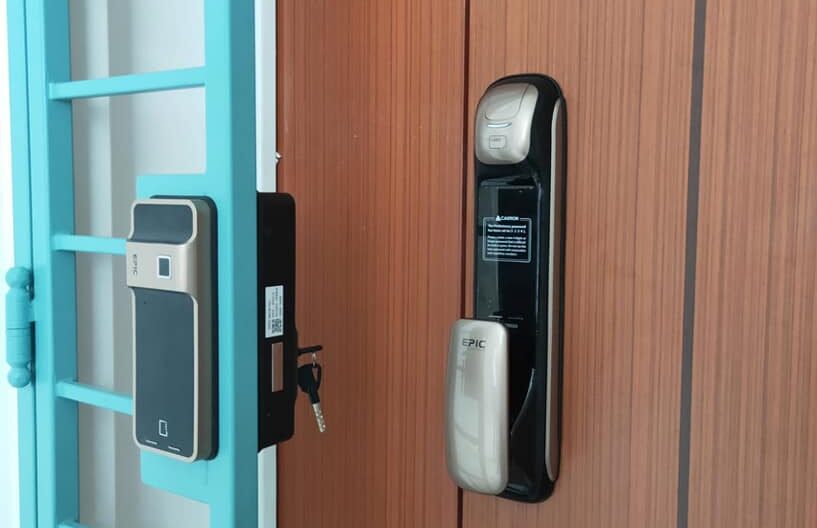
A main gate digital lock can be installed on most HDB gates by securing the lock body to the gate frame and connecting it to the existing latch mechanism. Installation typically takes one to two hours with basic tools. Ongoing maintenance involves changing batteries every six to twelve months, wiping contact points clean, and testing the lock mechanism quarterly to ensure reliable operation.
Upgrading to a main gate digital lock is one of the most practical security improvements an HDB homeowner can make. You eliminate the need for physical keys, get access logs on supported models, and simplify entry for household members. But the upgrade only works well if the installation is done correctly and the lock is maintained consistently.
This guide covers everything you need to know — from choosing the right lock to keeping it running smoothly for years.
Can You Install a Digital Lock on an HDB Gate?
Yes, most HDB main gates are compatible with digital locks. Singapore’s HDB gates are generally built to a standardised size, which means many digital lock models are designed specifically to fit them. That said, you should verify the gate profile (the cross-section shape of the gate frame) before purchasing.
Common compatible gate profiles include:
- C-profile gates (most common in older HDB flats)
- L-profile gates
- Round-tube gates
If you are unsure of your gate type, measure the frame width and cross-section shape, or send a photo to your lock supplier before committing to a model. A mismatch here means the lock will not sit flush — and that affects both security and aesthetics.
What to Check Before Installation
Rushing into installation without preparation is the most common reason homeowners run into problems. Take fifteen minutes to assess the following before you begin.
Gate Condition
Check whether the gate closes squarely and latches without resistance. If the gate is warped or the existing latch is stiff, fix these issues first. A digital lock cannot compensate for a poorly aligned gate — it will accelerate wear on the motor and latch mechanism.
Wall Thickness and Frame Clearance
Measure the depth of your gate frame. Most digital locks are designed for a standard range (typically 20mm to 40mm). If your gate frame is unusually thin or thick, you may need an adapter bracket.
Power Source
The majority of gate digital locks in Singapore run on AA or AAA batteries. Check how many the model requires and whether the battery compartment is accessible from the inside of the gate (which is safer and more convenient). A few premium models support a wired power backup — useful if you want to avoid battery changes altogether.
How to Install a Main Gate Digital Lock: Step-by-Step
Professional installation is always an option, but many mid-range digital locks are designed for straightforward DIY fitting. Here is a general process that applies to most gate lock models.
- Remove the existing gate latch or lock. Unscrew the existing hardware and keep the screws in case you need them for alignment. Clean the area where the new lock will sit.
- Align the lock body with the gate frame. Place the lock body against the gate frame and mark the screw holes with a pencil. Double-check alignment with a spirit level if the gate frame is not perfectly straight.
- Drill pilot holes if required. Some gate frames are too hard for direct screw entry. Use a 3mm drill bit for pilot holes to prevent the frame from splitting or stripping.
- Secure the lock body. Use the screws provided with the lock. Do not over-tighten — this can warp the casing and affect the mechanism.
- Install the strike plate on the gate post. The strike plate must align exactly with the latch bolt. Test by closing the gate and checking that the bolt enters the strike plate cleanly without force.
- Insert batteries and run initial setup. Load the batteries according to the manual, then follow the setup steps to programme your PIN, fingerprint, or RFID card. Test all access methods before closing and locking the gate.
If the lock comes with a physical key override (which most do), programme this access method last and store the keys somewhere separate from your front door keys.
Battery Management: The Most Overlooked Maintenance Task
Battery failure is the leading cause of digital lock lockouts in residential settings. Most locks will give low-battery warnings — usually a series of beeps or an LED indicator — but these warnings are easy to ignore.
Here is a simple battery management approach:
- Replace batteries every six months as a rule, regardless of the warning indicator
- Use high-quality alkaline batteries (Panasonic, Duracell, or equivalent). Cheap batteries drain faster and can leak, damaging internal circuitry
- Never mix old and new batteries in the same compartment
- Keep a spare set of batteries near the door, not inside the lock compartment
Most gate digital locks in Singapore include an external 9V battery terminal on the exterior panel. This is specifically designed for emergency access when internal batteries have died — press the terminal against a 9V battery to get enough power to unlock. Know where this terminal is on your model before you ever need it.
Cleaning and Protecting Your Digital Lock
HDB main gates are exposed to Singapore’s humidity, occasional rain splash, and dust. Without regular cleaning, fingerprint sensors degrade, keypads become unresponsive, and metallic finishes corrode.
Monthly Cleaning Routine
- Wipe the keypad and fingerprint sensor with a dry microfibre cloth
- Use a cotton swab to clean around button edges and sensor borders
- For stubborn grime, dampen the cloth very lightly with water — never use alcohol or solvent-based cleaners on the sensor surface
Protecting Against Humidity
Singapore’s climate means your gate lock faces near-constant moisture exposure. Check that the lock’s IP (Ingress Protection) rating is suitable for outdoor use — look for at least IP44 or higher for gate installations. If the lock is directly exposed to rain, consider a small rain cover or awning above the gate to extend its lifespan significantly.
Quarterly Checks: Keeping the Mechanism Reliable
A five-minute quarterly inspection can prevent most mechanical failures before they happen.
| Check | What to Look For | Action if Issue Found |
|---|---|---|
| Latch bolt movement | Smooth extension and retraction | Apply dry lubricant (PTFE spray) |
| Screw tightness | No loosening from vibration | Re-tighten with original screws |
| Strike plate alignment | Bolt enters without scraping | Adjust strike plate position |
| Fingerprint sensor accuracy | Recognises fingerprints first attempt | Re-register fingerprints if needed |
| Access codes | All active PINs functioning | Delete unused codes, update regularly |
Do not use WD-40 on the latch mechanism — it attracts dust and degrades rubber seals over time. A dry PTFE-based lubricant is the correct choice for digital lock components.
When to Call a Professional
DIY maintenance covers most routine issues. However, some situations call for a trained technician:
- The motor runs but the bolt does not move — possible gear wear inside the unit
- The lock resets randomly or loses programmed codes — may indicate a firmware issue or water ingress
- Physical damage to the casing from attempted forced entry
- Fingerprint sensor failure after cleaning — sensor replacement may be needed
Most reputable digital lock suppliers in Singapore offer a one to two-year warranty on parts and labour. Check your warranty terms before attempting any disassembly — opening the casing without authorisation can void coverage.
Choosing the Right Lock for Your HDB Gate and Main Door
If you are upgrading both your gate and main door simultaneously, choose locks that operate on a unified access system where possible. Some brands offer a single fingerprint or PIN that works across both the digital lock for main door and the gate lock — a significant convenience for families with young children or elderly residents.
Key features to compare when choosing:
- Access methods: PIN, fingerprint, RFID card, app-based, or physical key override
- IP rating: Minimum IP44 for gate use; IP65 or higher for exposed installations
- Battery life: Look for models rated at 8,000 to 12,000 cycles per battery set
- Auto-lock feature: Automatically re-locks after a set interval — essential for household security
- Low battery alert: Audible and visual warnings with sufficient lead time
For trusted options built specifically for HDB installations, Lockin Singapore offers a range of gate and main door digital locks designed for Singapore’s climate and gate profiles, with professional installation support available.
Frequently Asked Questions
How long does it take to install a digital lock on an HDB gate?
Most installations take between one and two hours. This includes removing the old latch, fitting the new lock body and strike plate, and completing the initial setup. Professional installers can typically complete the job faster if the gate is in good condition.
How often should I change the batteries in my gate digital lock?
Replace batteries every six months as a standard practice, even if the low-battery warning has not triggered yet. Use quality alkaline batteries and never mix old and new cells, as this reduces overall battery performance and can cause unexpected power loss.
What happens if the batteries die completely on my gate digital lock?
Most digital locks include an external 9V battery terminal on the front panel for emergency access. Press a 9V battery against the terminal to temporarily power the lock and enter your PIN or use another access method to unlock the gate.
Can I install a digital lock on any HDB gate?
Most HDB gates with C-profile, L-profile, or round-tube frames are compatible with standard digital lock models. Always verify your gate’s frame profile and dimensions before purchasing. Some older or non-standard gates may require an adapter bracket for a secure fit.