


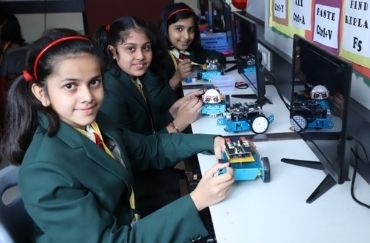
You’re standing outside the school gate at 7:45 am, holding a printed brochure that promises “21st-century learning” and “AI-enabled classrooms”. The security guard smiles and points you towards the admin office. Inside, a counsellor walks you through a slick presentation: smart boards in every room, tablets for each child, robotics labs, and a long list of awards.
But here’s what no brochure tells you: the real test isn’t what you see during the open house. It’s what happens on a normal Tuesday morning when no one’s performing for parents.
If you’re hunting for the Best ISC School in Mulund, this guide is for you. No fluff. No ranking lists. Just what to actually look for when tech meets real classrooms in ICSE schools around Mulund (and yes, even if you’re also checking Schools in Bhandup).
Start with the right question
Most parents begin with: “Which school has the best smart classrooms?”
Better question: “How do teachers here use tech on a day when no parent is watching?”
Smart boards, projectors, and tablets are easy to buy. What’s hard — and what actually matters — is whether tech helps kids learn better, or just looks good in photos.
What “smart classroom” actually means in Mulund ICSE schools
In most ICSE schools in Mulund West and Mulund East, a “smart classroom” usually includes:
- A digital board or projector connected to a teacher’s laptop
- Access to pre-loaded lessons (videos, animations, interactive quizzes)
- Sometimes, student devices (tablets or laptops) for specific subjects
- Basic internet for research or teacher-led demos
Some schools go further with subject-specific apps, digital homework platforms, or recorded revision sessions. But the hardware is only step one.
The real difference between an average school and the Best ISC School in Mulund shows up in how teachers use these tools daily.
The open house trap (and how to avoid it)
Open houses are curated. Classrooms are spotless. Teachers are on their best behaviour. Tech is switched on and working perfectly.
That’s useful — but incomplete.
Here’s the angle most articles skip: visit during a normal school day. Not the grand tour. Not the admission open house. Just a regular weekday when classes are running as usual.
Why this matters:
- You’ll see whether smart boards are actually used, or covered with dust
- You’ll notice if teachers speak calmly to kids, or rush through lessons
- You’ll catch the real energy: are students engaged, or just copying from the screen?
- You’ll see how tech handles real-life glitches (projector not working, internet down, etc.)
A school might look perfect in photos. But on a random Wednesday at 10:30 am, you’ll learn far more about daily teaching quality than any brochure can show.
If the school says “no visits during school hours”, ask if you can sit in on one period with permission. Many good schools in Mulund will allow this for serious parents.
What to check inside a smart classroom
When you step into a classroom, don’t just glance at the screen. Look closer.
-
Is the tech actually being used — or just switched on?
Watch for:
- Teacher using the board to explain a concept with visuals, not just writing notes
- Students interacting with the content (answering on-board quizzes, discussing a video, etc.)
- Tech used for things that are hard to do on a normal blackboard (animations in science, maps in Geography, audio in languages)
Red flag: The smart board is on, but the teacher is just reading from a textbook while a static slide plays in the background.
-
How do students respond?
Stand near the back (with permission) and observe:
- Are kids leaning forward, asking questions, or zoning out?
- Do they wait for the teacher to click “next”, or are they thinking ahead?
- Is there a mix of screen time and discussion, or is it one long lecture with visuals?
In strong ICSE classrooms, tech supports thinking — it doesn’t replace it.
-
Teacher’s comfort with the tools
Some teachers treat smart boards as fancy whiteboards. Others weave them into lessons naturally.
Signs of good integration:
- Teacher switches between board, textbook, and discussion without losing flow
- Tech is used to clarify tough topics, not just to fill time
- If something fails (internet drops, video doesn’t load), the teacher adapts quickly instead of panicking
This is where experience counts. A school with 20-year veteran teachers who’ve adapted to new tech often beats a shiny new campus with constantly rotating staff.
Beyond the classroom: labs, devices, and digital habits
Smart boards are just one piece. Also check:
Computer and science labs
- Are computers recent enough to run current software?
- Do science labs have working equipment, or are they locked “for safety”?
- Are students actually doing experiments, or just watching demos?
Student devices (if the school uses them)
- What’s the screen-time policy?
- Are tablets/laptops used for creation (projects, coding, research) or just consumption (videos, PDFs)?
- How does the school handle distractions or misuse?
Digital homework and parent apps
Many ICSE schools in Mulund now use apps for:
- Homework updates
- Attendance and report cards
- Announcements and fee reminders
Ask:
- How often do teachers post updates?
- Can you message teachers directly, or is it all one-way?
- Is there a clear policy on response time?
Good schools strike a balance: tech makes communication easier, but doesn’t turn teachers into 24/7 support staff.
Schools in Mulund vs Schools in Bhandup: does location matter for tech?
If you’re also looking at Schools in Bhandup, you’ll notice similar tech claims there too. The difference isn’t really Mulund vs Bhandup — it’s school-to-school.
Some older, well-established ICSE schools in Mulund have slowly upgraded over the years and now run very solid tech programmes. Some newer schools in Bhandup have built everything from scratch with modern tech in mind.
What matters more than pin code:
- How long has the current leadership team been in place?
- What’s the average teacher tenure?
- How do they train teachers to use new tools?
A school with stable leadership and continuous teacher training will usually outperform a flashy new campus that changes principals every two years.
Questions to ask on your visit (that most parents skip)
Instead of “Do you have smart classes?”, try these:
- “Can you show me a typical lesson plan where tech is used? Which subject, which topic?”
- “What happens when the internet or projector fails during class?”
- “How do you decide when NOT to use the screen?”
- “How often do teachers get training on new tools or apps?”
- “Can I speak to a parent whose child is in Class 7 or 8 about how tech is used day-to-day?”
The Best ISC School in Mulund won’t hesitate to answer these. They’ll have clear examples, not just marketing lines.
A quick reality check: tech isn’t the goal, learning is
It’s easy to get dazzled by “AI labs” and “robotics programmes”. But for most ICSE students in Classes 5–10, the basics matter far more:
- Clear explanations in Maths and Science
- Strong reading and writing habits in English and second language
- Regular practice with past papers and concept-based questions
- Teachers who notice when a child is struggling and step in early
Tech should support all of this. If it’s becoming the main focus — with kids spending more time on screens than thinking, discussing, or writing — that’s a warning sign.
One simple exercise before you decide
Pick two shortlists:
- 2–3 ICSE schools in Mulund you’re seriously considering
- 1–2 backup options (maybe in Bhandup or nearby)
For each, try to:
- Visit once during an open house or scheduled tour
- Visit again on a normal weekday (even if it’s just dropping your child for a trial day or sitting outside during school hours to watch the flow)
- Talk to at least one current parent (not the ones the school introduces, but someone you meet at the gate or through your own network)
Compare notes:
- Which school felt more relaxed and real?
- Where did teachers seem more patient and present?
- In which classroom did you think, “My child would be comfortable here every day”?
That gut feeling — backed by actual observation — is worth more than any ranking list.
FAQ: Real questions Mumbai parents ask about smart classrooms in ICSE schools
- Are smart classrooms necessary for good ICSE results in Mumbai?
No. Many top-scoring ICSE schools in Mumbai use very basic tech. What matters is teaching quality, regular practice, and strong fundamentals. Smart boards help when used well, but they don’t replace good teachers. - How much screen time is normal in ICSE schools with smart classes?
In well-run schools, direct screen time is usually limited to 20–40 minutes per subject, a few times a week. The rest is discussion, board work, textbooks, and hands-on activities. If your child is on a screen for most of the day, ask the school about their policy. - Should I prioritise schools in Mulund over Bhandup for better tech?
Not necessarily. Both areas have ICSE schools with good and average tech setups. Focus on the specific school’s teaching style, teacher stability, and how they use tech in daily classes — not just the locality. - What if my child is not comfortable with too much tech in class?
Tell the school upfront. Good ICSE schools will adjust — for example, limiting device use for your child, or ensuring most learning happens through discussion and writing. Tech should support different learning styles, not force one size fits all.
Final thought
Choosing a school is less about finding the “best” on paper and more about finding the right fit for your child’s daily life. Smart classrooms can be a great tool — when they’re used thoughtfully, not just for show.
If you’re still unsure which ICSE school in Bhandup matches your child’s needs, feel free to reach out. I can help you think through your shortlist, visit plans, and the right questions to ask on the ground. No pressure — just a second opinion from someone who’s seen how these schools actually work day-to-day.