

Zoho One, the comprehensive suite of apps from Zoho, brings CRM, finance, operations, HR, and other business functions into one connected ecosystem.
But in an enterprise environment, Zoho One is often one part of a much larger technology landscape that includes legacy ERP systems, on-premises databases, custom applications, and workloads running across AWS or Azure.
That makes integration and workflow automation an important part of getting the full value from Zoho One. The focus is not simply on making applications exchange data, but on enabling business processes to move smoothly across systems, regardless of where those systems are hosted.
In this blog, we draw on our experience as a Zoho Consulting Service Company to explore how Zoho One fits into a multi-cloud environment and how businesses can automate workflows between Zoho and legacy systems.
Why Businesses Need to Connect Zoho One with Legacy Systems
We know Zoho One can support a broad range of business functions, but enterprises often have established systems that continue to handle critical processes.
An ERP, manufacturing application, database, or custom business system may remain the system of record for a specific function even as other teams move to Zoho.
This makes connectivity an important part of a Zoho One implementation.
When applications remain isolated, teams often have to manage the gaps between them. Information captured in Zoho may need to be transferred to another system, while updates from an ERP or legacy application may need to return to Zoho.
A Zoho Integration Service can connect these environments so that existing applications remain in place while becoming part of the same business workflow. The goal is not to standardize everything on one platform, but to make the systems that matter to the business work together.
How Zoho One Fits into a Multi-Cloud Environment
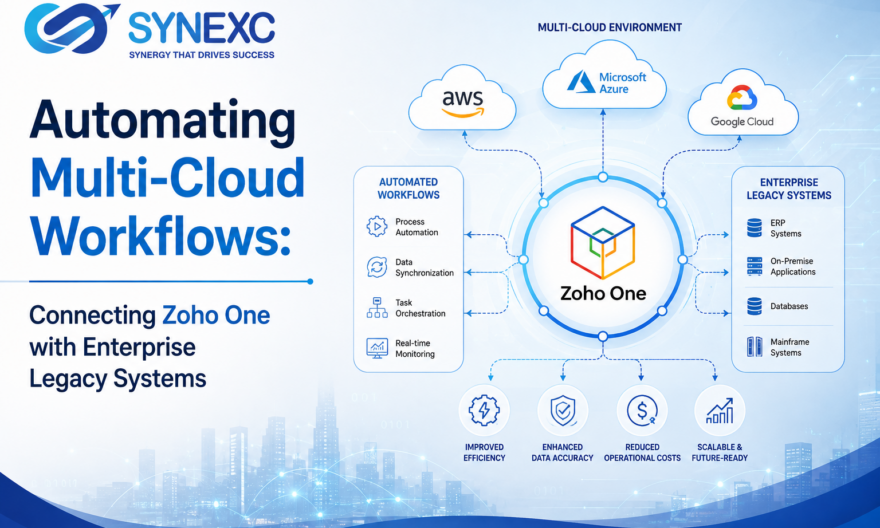
An enterprise workflow rarely stays within one application or one infrastructure environment. A process can begin in Zoho CRM, rely on data stored in an on-premises ERP, use a service hosted on AWS or Microsoft Azure, and then return information to Zoho for the next stage.
This is where Zoho One becomes part of a broader multi-cloud architecture rather than operating as an isolated business suite. Zoho applications can sit alongside existing enterprise systems, with integration layers connecting the applications and services involved in a workflow.
The role of Zoho One in this environment is to act as the business-facing layer for processes that need information from multiple sources. CRM, finance, operations, and other Zoho applications can exchange data with external systems while those systems continue to perform their specialized functions.
This also gives businesses room to evolve their technology environment. They can:
- Add new cloud applications without rebuilding existing systems.
- Retain legacy platforms that still support critical operations.
- Move workloads between environments while maintaining connected workflows.
That is what makes multi-cloud workflow automation different from simply having applications in different clouds. Here, the systems are connected around the business process, so the location of each application becomes less important than how effectively they work together.
Automating Workflows Between Zoho One and Legacy Systems
Surely data integration is useful, but workflow automation goes a step further.
Instead of simply moving information between applications, automation can trigger the next business action based on what happens in another system.
A transaction created in Zoho can initiate processing in an ERP, while an update from that ERP can automatically return to Zoho for the next stage of the process.
The important point is that automation should connect the business process, not just the applications involved in it.
When these processes are automated, businesses can reduce delays between process stages
and dependency on employees to keep multiple systems synchronized. This is where a well-designed Zoho Integration Service becomes valuable. It creates continuity between systems that may have very different technologies underneath them while keeping the business workflow moving.
Using APIs, Zoho Flow and Middleware for Integration
The technology behind a Zoho integration service depends on the systems involved and the complexity of the workflow.
- APIs are central to many modern integrations because they allow applications to exchange data and trigger actions programmatically. When a legacy or enterprise application exposes suitable APIs, it can become part of an automated workflow without manual data transfers.
- For more straightforward application connections, Zoho Flow can automate actions between Zoho and other business applications. It can help connect systems without requiring every integration to be developed from scratch.
- More complex enterprise environments may require middleware or an integration layer between Zoho One and existing systems.
This layer can manage:
- Data transformation and mapping
- Authentication and validation
- Routing between different systems
- Communication with applications that cannot connect directly
Benefits of Automating Multi-Cloud Workflows
The value of multi-cloud workflow automation comes down to how well the business can operate across its technology environment.
Automated connections can help businesses:
- Reduce repetitive manual work and duplicate data entry.
- Improve consistency across applications.
- Reduce delays caused by manual handoffs.
- Give teams better visibility into information from connected systems.
- Extend the value of existing enterprise applications.
It also means businesses can continue using systems that still serve an important purpose while making them part of a more connected and automated environment.
For enterprises, this can make integration a practical part of modernization rather than an all-or-nothing replacement exercise.
How Synexc Helps Businesses Connect Zoho One with Existing Systems
At Synexc, we approach Zoho One integration by looking at the wider business environment rather than treating Zoho as a standalone platform.
As a Zoho Consulting Service Company, we work with organizations that may already have ERPs, databases, custom applications, cloud infrastructure, and other enterprise systems alongside Zoho.
The focus is on understanding the workflow first and then designing the right connections between the systems involved. Depending on the requirement, this can include Zoho CRM integration, Zoho Books, Zoho Creator, Zoho Flow, APIs, custom integrations, and middleware.
At Synexc, we see effective Zoho consulting as more than implementing Zoho One. It is about making Zoho One work alongside legacy and multi-cloud environments.
Conclusion
In short, connecting Zoho One with existing enterprise systems can make multi-cloud workflows far more seamless without forcing businesses to replace technology that still works.
If you are looking to connect your Zoho environment with legacy or cloud systems, talk to our expert Zoho consultants at Synexc about building the right Zoho integration for your business.