Modern offices need safe and simple ways to manage entry without slowing daily work. Teams seek systems that keep entry quick while guarding spaces well and keeping things in order. Many workplaces now adopt smarter methods that remove the need for keys or cards.
Face recognition door access brings a fast and smooth way to control entry. It scans faces in seconds and opens doors with ease. As a result, offices boost safety while keeping movement steady throughout the day.
How Face Recognition Systems Work
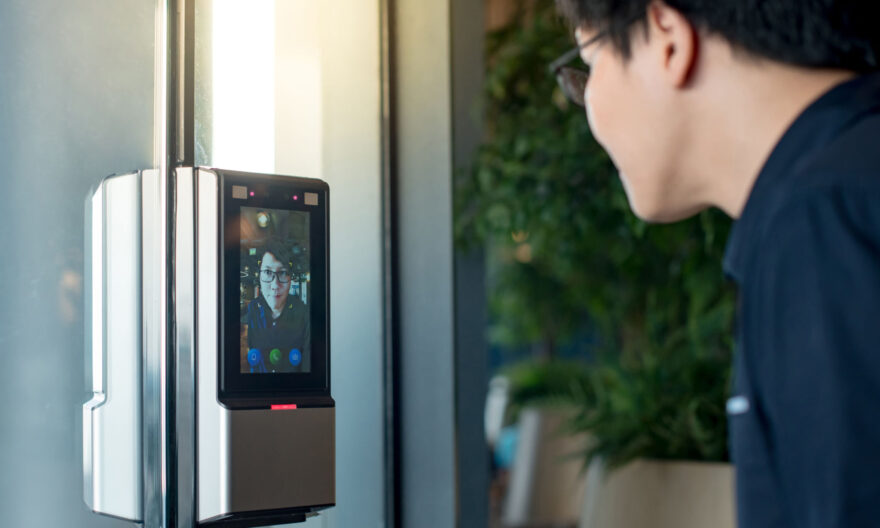
A face system scans and maps key points on a person’s face. Then, it stores this data in a secure system. When someone stands at the door, the system compares the face with stored data.
Key Steps in the Process
- The camera captures a live image.
- The system checks facial features.
- It matches the face with stored records.
- The door unlocks if it finds a match.
Because of this process, entry takes only a few seconds. Also, the system avoids physical contact, which keeps things clean and quick.
Core Features of Modern Access Systems
Modern systems bring strong features that support daily office needs. These features help teams manage entry with ease and control.
Essential Features
- Real-time face detection.
- Secure data storage.
- Fast user recognition.
- Access logs for tracking.
- Integration with entry systems
In addition, these features help offices track movement and manage access rights. So, teams stay aware of who enters and leaves the space.
Benefits for Office Spaces
Offices aim to balance safety and ease. A face recognition door access system for offices helps meet both needs.
Why Offices Prefer It
- Quick entry reduces queues.
- Contactless access improves hygiene.
- Strong security blocks unauthorised entry.
- Easy tracking of staff movement.
In contrast, fingerprint access for the door needs touch. So, it may slow entry during busy hours. Moreover, face systems handle high traffic with ease.
Improved Security and Control
Security stands as a top need for any office. Face systems raise this level by linking access to a person’s unique features.
How Security Improves
- Each face acts as a unique key.
- Systems block unknown users.
- Logs record each entry attempt.
- Admins control access levels.
Because of this, offices reduce the risk of unauthorised entry. Also, teams gain full control over who can enter each area.
Face Recognition vs Fingerprint Access
Both systems serve the same goal. Yet, they differ in use and comfort.
Main Differences
- Face systems work without touch.
- Fingerprint systems need direct contact.
- Face scans process faster in large offices.
- Fingerprints may fail with dirt or cuts.
Therefore, many offices now shift towards face systems. Still, some workplaces keep both for added control.
User Experience and Ease of Use
A good fingerprint door access system should feel simple for all users. Face systems offer a smooth and quick process that suits daily office flow.
What Users Experience
- No need to carry cards or keys.
- Fast entry with a simple glance.
- No delay during peak hours.
- Easy enrolment process.
As a result, staff move through entry points with ease. Also, this reduces stress during busy times.
Where These Systems Fit Best
Different office setups need different solutions. However, face systems suit many layouts.
Common Use Areas
- Main office entrances.
- Restricted zones like server rooms.
- Meeting rooms with sensitive data.
- Shared workspaces with high footfall.
Because of this flexibility, offices can place the system where they need strong control.
Integration with Office Systems
Modern offices use many tools for daily work. So, fingerprint door access systems should connect with these tools for better control.
Integration Options
- Attendance tracking systems.
- Visitor management tools.
- Security monitoring systems.
- Building management systems.
When systems connect, offices gain better insights. Also, this reduces manual work and improves accuracy.
Data Privacy and Protection
Offices must protect user data at all times. Face recognition door access system for offices store sensitive data, so protection becomes a key focus.
How Systems Protect Data
- Encrypted storage of facial data.
- Controlled access to system records.
- Regular system updates.
- Clear data policies.
Because of this, offices maintain trust among staff. Also, they meet data protection standards.
Things to Consider Before Installation
Before choosing a system, offices should review their needs. This helps avoid issues later.
Points to Check
- Size of the workforce.
- Level of security needed.
- Entry and exit flow.
- System integration with current tools.
Also, a proper setup ensures smooth use from day one. So, careful planning matters.
Common Challenges or Solutions
Every system may face some issues. However, offices can solve them with the right steps.
Possible Challenges
- Poor lighting at entry points.
- Changes in user appearance.
- System setup errors.
- Network delays.
Simple Solutions
- Install proper lighting.
- Update user data when needed.
- Train staff for system use.
- Ensure stable network support.
As a result, offices keep the system running without major issues.
Final Thoughts
Office security keeps evolving as workplaces adopt smarter and more reliable systems. Teams now choose solutions that offer both ease and strong control without adding extra steps for staff. A good access system supports daily flow while guarding every space. Face recognition door access helps offices strike this balance with speed and accuracy. It creates a smooth entry experience while keeping strict control over access. In the end, offices gain better security and a more efficient work environment.
FAQs
- How long does it take to recognise a face at the door?
The system spots a face in just a few seconds. It scans and checks the data fast, so users do not have to wait. This helps staff move in and out without any hold-up during busy office hours.
- Is this system safe for office use?
Yes, the system delivers strong safety features. It stores data in a secure way and lets only approved users enter. It also logs each entry, which helps track movement inside the office with ease.
- Can the system work in low-light conditions?
Most modern systems perform well in low light. They use smart sensors to detect faces even in dim areas. However, good lighting near entry points boosts accuracy and keeps the system running at its best.
- What happens if someone’s appearance changes?
The system still recognises small changes like glasses or hairstyles. However, if the change looks major, the user may need to update their profile. This keeps the system ready to identify them without any trouble.