

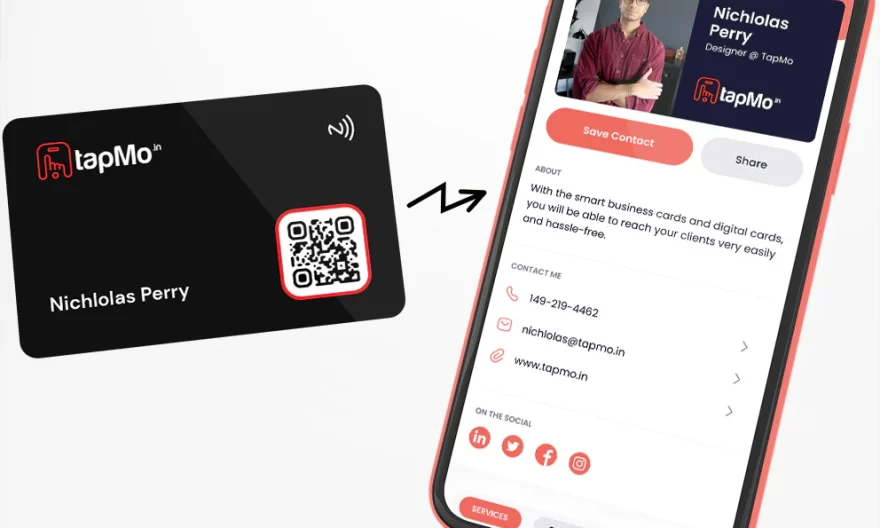
An NFC networking card shares contact information instantly by using near-field communication technology embedded in a physical card. When tapped against a smartphone, it triggers an automatic transfer of digital contact details — no app download required, no manual entry, no paper exchange. The entire process takes under two seconds and works with most modern iOS and Android devices.
If you have ever fumbled through a stack of paper cards after a conference or watched a promising connection slip away because you ran out of cards, the shift to an nfc networking card is not just a novelty — it is a practical upgrade to how professionals manage first impressions.
What Is NFC Technology and How Does It Work in a Business Card?
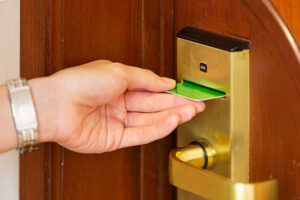
NFC stands for Near Field Communication — a short-range wireless protocol that allows two devices to exchange data when brought within a few centimetres of each other. The same technology powers contactless payments, transit cards, and hotel key cards.
Inside an NFC business card, there is a small passive chip and antenna embedded within the card material. The chip stores a URL, vCard, or digital profile link. When a compatible smartphone is tapped against the card, the phone’s NFC reader powers the chip and pulls the data — no battery in the card needed, no Bluetooth pairing, no QR scanning delay.
What Information Can an NFC Card Share?
The answer depends on what you programme into the chip, but typical data includes:
- Full name, job title, and company
- Phone number and email address
- LinkedIn, Instagram, or other social profiles
- Website or portfolio URL
- Calendar booking link or WhatsApp contact
More advanced cards redirect to a hosted digital profile page that can be updated any time — meaning the card never becomes outdated even if your number changes or you switch companies.
How the Instant Contact Transfer Actually Happens
The tap-to-share process is deliberately frictionless. Here is what happens in real time:
- You tap your NFC card to the back of the recipient’s phone. No unlocking needed on most Android devices; iPhone users on iOS 14+ will see an automatic notification banner appear.
- A prompt appears on their screen — either a “Save Contact” dialogue or a link to your digital profile page.
- The recipient taps to save or visit. Their contact list is updated immediately, or your profile is bookmarked in their browser.
- No follow-up required. No typing an email address. No photographing a card. No forgetting the name from the stack you collected at the event.
The entire exchange takes less time than a handshake. For sales executives closing multiple conversations in a networking room, that reduction in friction translates directly into more connections retained.
NFC Name Card vs. Traditional Paper Card: A Direct Comparison
| Feature | Traditional Paper Card | NFC Name Card
|
|---|---|---|
| Contact transfer speed | Manual entry required | Under 2 seconds |
| Update information | Reprint entire batch | Edit digital profile instantly |
| Environmental impact | Paper waste, reprinting cycles | One card, reused indefinitely |
| Data richness | Limited to printed fields | Links, social profiles, video, portfolio |
| Cost over time | Recurring print costs | One-time card investment |
| Analytics | None | Track taps, views, saves |
Why NFC Name Cards Are Gaining Ground in Singapore’s Business Culture
Singapore’s business environment is densely networked, fast-paced, and highly tech-literate. Corporate events, trade expos, and client meetings happen at a pace where efficiency is not just valued — it is expected. An NFC name card in Singapore signals that a professional is forward-thinking, detail-oriented, and respectful of others’ time.
The adoption rate of NFC-enabled smartphones in Singapore sits well above 90% among working professionals, meaning compatibility is rarely a concern. Both iPhone (from iPhone 7 onwards) and modern Android devices support NFC reading natively.
Is an NFC Namecard Suitable for Every Industry?
Short answer: yes, with appropriate customisation. The format adapts to the context:
- Financial services and banking: Clean, minimal design linked to a professional LinkedIn profile and contact form
- Creative and design industries: Links to a visual portfolio or showreel
- Real estate and property: Links to current listings or a calendar booking page
- Corporate leadership: Directs to a branded company profile or press kit
An NFC namecard is not a one-size-fits-all product — it is a platform that reflects exactly what you want your first impression to communicate.
The Eco-Efficiency Argument: More Than a Green Label
The average professional goes through hundreds of paper business cards per year. Globally, approximately 10 billion business cards are printed annually, with studies suggesting that 88% are discarded within a week of receipt. The environmental cost — paper, ink, printing energy, and waste — accumulates at scale.
One NFC card replaces all of that. There is no reprinting when details change, no landfill contribution after a role transition, and no ongoing material cost. For companies with ESG commitments or sustainability reporting requirements, switching teams to NFC networking cards is a small but visible, documentable step in reducing operational waste.
What to Look for When Choosing an NFC Networking Card
Not all NFC cards are built the same. Before purchasing, assess these factors:
- Chip reliability: Look for cards using industry-standard NXP NTAG chips, which are compatible across all NFC-enabled devices
- Profile platform: Does the card link to a hosted page you control, or is data stored statically on the chip? Hosted profiles allow real-time updates
- Customisation: Material options (metal, PVC, wood), design flexibility, and branding quality matter for first impressions
- Analytics dashboard: Enterprise buyers should look for tap tracking and engagement data
- Support and setup: Particularly important for teams rolling out cards at scale
Practical Tips for Making the Most of Your NFC Card
Owning the card is step one. Using it effectively is where results come from.
- Keep your digital profile updated — a stale profile defeats the purpose of a dynamic card
- Add a booking link to reduce the “let’s find a time” friction after meetings
- Pair your NFC tap with a brief verbal cue: “Tap my card — it’ll pull up everything you need”
- Use the analytics to identify which events or meetings generate the most profile views
- For team deployments, standardise the profile template while allowing individual personalisation
The professionals who get the most value from NFC cards treat them as an active part of their networking system, not a passive replacement for paper.
Final Thought
Networking has always been about making connections feel effortless. The tools that reduce friction — the ones that let you focus on the conversation rather than the logistics — are the ones that last. An NFC networking card does exactly that: it removes the administrative layer from introductions and puts the relationship front and centre.
For professionals in Singapore and across the region looking for a card that works as hard as they do, Genic Cards offers a well-regarded range of NFC business card solutions built for modern networkers — from individual professionals to corporate teams.
Frequently Asked Questions
Does the recipient need an app to receive contact details from an NFC networking card?
No app is required. When an NFC card is tapped against a compatible smartphone, the phone’s built-in NFC reader triggers automatically. On most Android devices, this works without unlocking. iPhones running iOS 14 or later also support background NFC reading natively, displaying a notification or prompt without any additional software.
What is the difference between an NFC namecard and a QR code card?
An NFC namecard transfers data via a tap — no camera, no scanning, no alignment needed. A QR code card requires the recipient to open a camera app, scan, and then navigate to a link. NFC is faster, more seamless, and works in low-light conditions where scanning can be difficult. Both methods can link to the same digital profile.
Can I update my NFC name card after it has been printed?
Yes, if your card links to a hosted digital profile. You can edit your contact details, add or remove social links, and change your booking URL at any time — without reprinting or reprogramming the card. The physical card itself remains the same; only the profile it points to changes.
Are NFC business cards compatible with all smartphones?
NFC networking cards are compatible with virtually all modern smartphones. Android devices have supported NFC since around 2011. iPhones support NFC reading from iPhone 7 onwards, with background reading (no app needed) available from iPhone XS and iOS 14+. In Singapore, where smartphone penetration is high, compatibility is rarely a barrier in professional settings.
How durable is an NFC business card compared to a paper card?
NFC business cards are significantly more durable than paper cards. Depending on the material — PVC, metal, or wood — they resist bending, moisture, and everyday wear. The embedded chip has no moving parts and is not affected by normal physical handling. A single well-made NFC card can last for several years with regular use.
Is an NFC name card in Singapore worth the investment for solo professionals?
For solo professionals who attend regular networking events, client meetings, or industry conferences, an NFC name card offers clear long-term value. The one-time cost eliminates recurring print expenses, the card never runs out, and the ability to track engagement provides insight that paper cards simply cannot offer. The return on investment becomes apparent quickly for active networkers.