


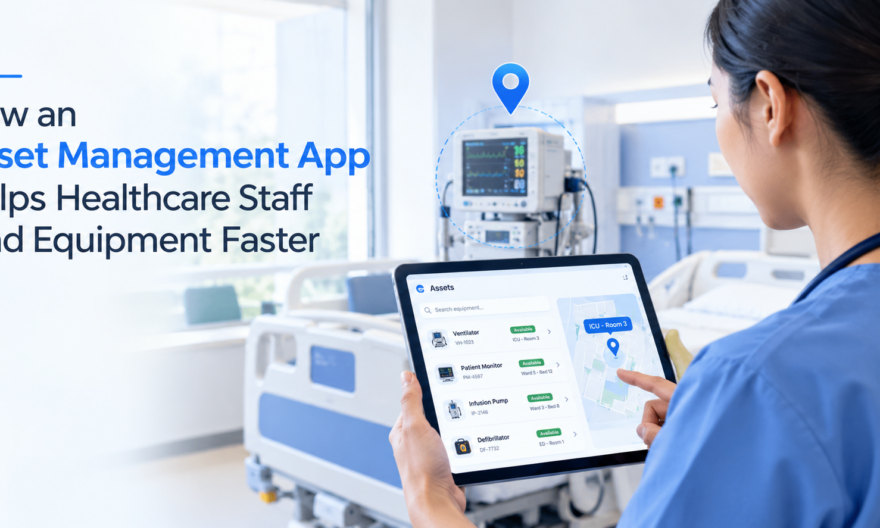
The medical equipment management software allows the medical personnel to have real-time information on the location of equipment, its availability, and previous users of the equipment. The medical personnel can use the mobile application to locate the equipment, borrow the equipment, and spend less time looking for important equipment.
Why Finding Equipment Is a Bigger Problem Than Most Hospitals Admit
Ask any nurse or ward coordinator, and you will find out the same – they spend a good amount of time searching for the equipment that was supposed to be easily accessible. Wheelchairs, infusion pumps, portable monitors, and ECG machines tend to disappear between departments or are simply left somewhere or in the wrong place since nobody knows about their return.
And it’s not only an unpleasant moment but also a patient safety concern. The delay in locating the equipment such as a blood pressure monitor can take up to 20 minutes – the minutes that can be better spent on bedside care in the high dependency area.
The basic problem is easy to grasp; most hospitals still use manual methods of tracking assets through Excel sheets, whiteboards, and paper records. None of these indicate where something currently is.
What a Medical Equipment Asset Management App Actually Does
An medical equipment asset management app is purpose-built to close this visibility gap. Rather than maintaining static records, it tracks assets in real time — giving every team member on the floor the same up-to-date picture of what’s available and where.
Here’s what the core functionality looks like in practice:
- Searchable asset database: Staff can pull up any piece of equipment by name, category, or ID number within seconds.
- Location visibility: Each asset is tagged to a ward, room, or zone — and that location updates whenever the item is moved or checked out.
- Check-in/check-out logging: Every time equipment leaves or returns to a department, it’s recorded against the staff member who used it.
- Mobile access: Staff access the system from a smartphone or tablet — no need to log into a desktop terminal at the nurses’ station.
- Availability status: Equipment shows as available, in use, under maintenance, or out of service — so staff know before they walk across the building.
Mobile Access Changes How Floor Staff Work
The move away from desktop-only asset management to mobile-first has greater significance than one might expect. With desktops, employees must manually go back to their workstations to see if an item is available or to return an item. This is not feasible in a hectic ward setting.
The mobile application for asset management allows a nurse to verify the availability of equipment while moving around between different rooms. A porter can record the return of equipment right after delivering it to its designated storage area. An operations supervisor can monitor asset usage statistics from any place within the hospital.
The effect is cumulative. If something only takes 30 seconds to locate or check rather than 5 minutes, then it gets done every time. It gets done every time because people can easily log everything. Logging everything ensures that information is accurate. Accurate information improves decision-making.
How Check-In/Check-Out Reduces Asset Loss and Duplication
The Hidden Cost of Untracked Equipment
Without checking out the equipment formally, it is as if the equipment vanishes from the system altogether. A ventilator that was taken from the ICU and put away in a storage room might not be recorded in the system. When the ICU requires it later on, nobody will know where the ventilator was put.
Based on figures from the industry, healthcare organizations stand to lose between 10% and 20% of their movable medical equipment each year because of misplacement, theft, and other related reasons. It is quite a risk for a hospital with hundreds of traceable items.
How the Check-In/Check-Out Process Works
With a proper asset management system in place, the process is straightforward:
- A staff member scans the asset’s barcode or QR code using their mobile device.
- They select “check out” and confirm the destination ward or patient area.
- The asset’s location and assigned user update immediately in the system.
- When the equipment is returned, a check-in scan closes the loop and marks it as available.
This creates a clear chain of custody. It also generates audit trails that are useful during accreditation reviews, compliance checks, and equipment recalls.
Location Visibility Across Large Facilities
There is an inherent problem with multi-level hospitals and large medical centers. Medical equipment moves around from theatre to wards, radiology department, and outpatients all the time. If there is no proper location system to identify it, then you will have to rely on memory or good fortune.
Modern asset management apps address this through several mechanisms:
- Zone-based tracking: Assets are assigned to physical zones (e.g., Ward 3B, Theatre 2, Radiology), and any movement is logged at the point of transfer.
- Last-known location display: Even if an asset hasn’t been recently scanned, the app shows where it was last recorded — giving staff a starting point rather than a blank search.
- Asset history log: A full movement history lets administrators spot patterns, such as equipment consistently being pulled from one ward to another without being returned.
Practical Benefits for Different Healthcare Roles
The value of an asset management app isn’t uniform across all roles — it solves different problems depending on who’s using it.
| Role | Primary Pain Point | How the App Helps
|
|---|---|---|
| Nurses | Time spent locating equipment mid-shift | Instant location search on mobile |
| Doctors | Equipment unavailable at point of care | Real-time availability status before requesting |
| Operations Teams | Asset loss, over-procurement, maintenance gaps | Utilisation data, maintenance scheduling, audit trails |
| Hospital Administrators | Compliance documentation and cost control | Centralised reporting and asset lifecycle tracking |
From Reactive to Proactive Equipment Management
One of the advantages that is somewhat overlooked when a hospital introduces an asset management system is that the facility transitions from operating reactively to being proactive. When there is no system in place, the hospital reacts to any problem only once it has already happened.
Let’s take the scheduling of maintenance, for example. Machines that aren’t tracked tend to fail their maintenance schedule since there is no record of when the machine was last serviced and how much use it has gotten. An effective asset management solution would track the number of cycles and alert when a machine needs to be inspected.
In the same way, utilization data assists procurement officers in making better decisions. Should usage data indicate that a certain ward tends to borrow equipment from other wards, it is time to move or purchase more equipment rather than acting on anecdotal data.
Getting Staff to Actually Use the System
Adoption of technology in clinical settings is very hard. In case a system makes you go through extra steps in an existing busy schedule, people will come up with workarounds. All these characteristics are well incorporated into the best asset management software solutions – few clicks to get the job done, quick searching, and fast barcode reading not requiring precise placement.
Training must be concise and job-oriented. A nurse should understand the process of searching and signing out. An operations manager should understand the process of generating reports. Keeping these paths separate keeps the orientation process from being too daunting.
Systems that come into operation with internal champions within the organization, such as a senior nurse or an operations person pushing the system from the floor level, have better success in implementing the system.
Choosing the Right Solution for Your Facility
Not all asset management software is suitable for healthcare. The most common ones, which lack features like barcoding functionality and maintenance tracking capabilities among others, are not made for healthcare use but are inventory management systems. Find an application that is specifically tailored for healthcare.
Key questions to ask during evaluation:
- Does it support mobile access for all common device types?
- Can it handle multi-site or multi-ward deployments?
- Does it integrate with existing maintenance or procurement systems?
- How quickly can new assets be added and tagged?
- Is reporting flexible enough for compliance and internal audits?
Genica Assets offers a healthcare-focused asset management platform designed to address exactly these requirements — from real-time location tracking to mobile check-in/check-out and maintenance scheduling, built for the pace and complexity of hospital environments. Learn more about Genica Assets and what the platform can do for your facility.
Frequently Asked Questions
What is a medical equipment asset management system?
Medical equipment asset management system refers to software application which is used to trace the position, availability, use, and maintenance status of hospital equipment in real-time manner. The software enables healthcare professionals to find equipment faster, register check-in and check-out, and provide operations team with precise information for decision making.
How does an asset management app help nurses find equipment faster?
The asset management application enables nurses to look up assets by name or type on their mobile devices, which then provides instant information about the availability and location of the assets. This saves nurses the trouble of having to physically go to different departments in search of assets.
What is check-in/check-out in healthcare asset management?
Check In/Out is a procedure whereby the staff scans the bar code or QR code of the asset in order to record the time at which the equipment moves out of the department and returns. This helps in establishing a chain of custody, minimizing equipment loss, and maintaining the database with current location details.
Can an asset management system reduce equipment loss in hospitals?
Yes. Asset management programs use tracking through check in and check out systems and zone tracking, thus minimizing any unrecorded transfers of assets and equipment going missing. Facilities which utilize tracking tend to lose less assets than those without.
What types of medical equipment can be tracked with an asset management app?
All movable clinical devices can be traced – infusion pump, wheelchair, portable monitor, ECG device, ventilator, and surgical equipment among other devices. All devices that can be labeled using barcodes, QR codes, or RFID tags can be included in the system.
Is mobile access important for healthcare asset management?
Mobile access is very necessary in the clinical setting where most of the time you will not be working at a desk. Mobile-first asset management system enables nurses, porters, and managers to update the movement and check the availability of their equipment in real-time from anywhere in the hospital.