Paper business cards once ruled every meeting and event. Yet most ended up lost, binned, or forgotten. Today, people expect faster ways to save details without fuss. A digital business card gives you a simple way to share your contact info in seconds, without stacks of printed cards.
The challenge many face is keeping details updated and making sure people can reach them with ease. A digital card solves this with one shareable link or QR code that works anywhere.
In this guide, you’ll learn how a digital card works, why it matters, and how it makes every introduction smoother. Let’s break down how this small shift changes how you share your details for good.
What Is a Digital Business Card?
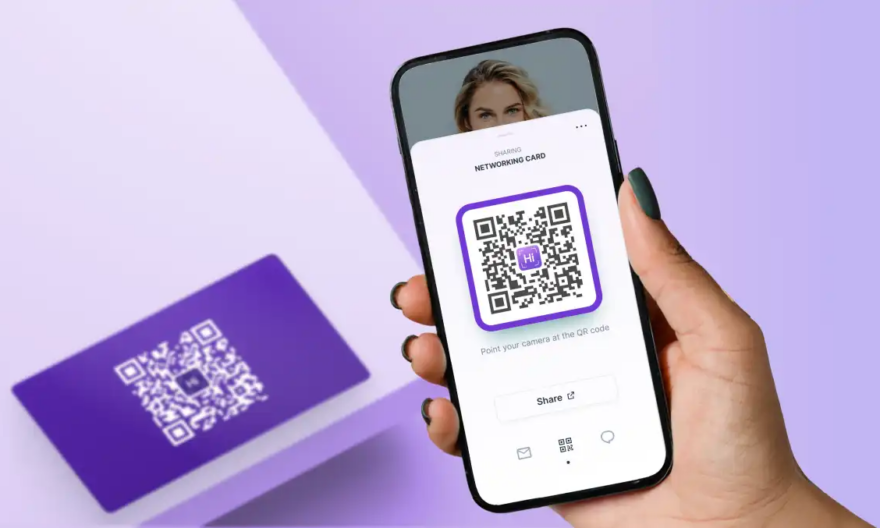
A digital business card is a shareable online profile that stores your contact details. Instead of handing over a paper card, you send a link, tap your phone, or let someone scan a code. Your details open straight away.
What it includes
- Name and job title
- Email and phone number
- Website and social links
- Company info
- Profile photo
- Added details like portfolios or booking links
You control everything from one dashboard and update it at any time—no reprints, no waste.
Why Digital Business Cards Are Replacing Paper Cards
1. Instant Sharing Without the Hassle
A digital card allows you to share your details with one tap, one scan, or one link. No need to dig through your bag or wallet.
What makes it fast
- Tap to share on any device
- Scan a QR Code Business Card in seconds
- Send via email, text, social apps, or NFC
People save your details straight to their phone. No typing. No mistakes.
2. Always Up to Date
Paper cards go out of date as soon as your role or number changes. A business card digital version updates live.
Why this matters
- You avoid reprinting costs
- Your contacts always reach the right number
- Your brand stays current
Your card becomes a live profile that grows with your career or business.
3. Better First Impressions
Most people forget paper cards within hours. A digital card stays memorable because it brings your brand to life.
Ways it enhances your impact
- Add photos or a short intro
- Link to your website or portfolio
- Share social profiles
- Display services and pricing
With richer details, people get a clearer sense of who you are and how you help.
4. A Greener, Smarter Choice
Traditional printing uses paper, ink, and shipping. A digital card removes waste completely.
The eco benefits
- Zero printing
- No waste
- Unlimited updates
- One card lasts forever
This helps your brand look modern and responsible.
How a Digital Business Card Works in Real Life
Scan, Tap or Share — It’s That Simple
The magic lies in easy sharing. Whether you meet someone in person or online, you can pass your details without missing a beat.
Three everyday use cases
- At meetings: share your QR code across the table
- At events: people scan your badge or phone screen
- Online: send your link in your email signature
Your details appear instantly on their device, ready to save.
Why People Prefer Digital Over Paper Today
People want speed and clarity. A digital card offers both. It feels sleek, modern, and practical.
Key reasons it wins
- No stacks of cards to manage
- Easy to share with groups
- Works on every device
- Cuts follow-up effort
- Helps you organise contacts
The simple act of sharing becomes smoother and more aligned with how people connect today.
Core Benefits for Professionals
1. Stronger Networking
Networking often moves fast. With a digital card, you react faster and connect with more people.
How it helps
- You build trust with a clean, modern share
- You reduce friction in follow-ups
- People remember you because the card stands out
This small tool can shift how others see your professionalism.
2. Easy Contact Management
Once someone scans your card, they save your details with a tap. No manual typing. No errors.
You stay organised
- Fewer missed leads
- Smooth follow-ups
- Clearer tracking of who you met
For businesses, teams can even sync cards across departments, keeping branding aligned.
3. Flexibility for Any Industry
A digital business card suits freelancers, founders, consultants, sales teams, and creatives.
What you can include
- Service lists
- Appointment links
- Portfolio samples
- Customer reviews
Your card becomes a small hub that people explore before even contacting you.
How to Create a Digital Business Card (Step-by-Step Guide)
Step 1: Choose the Right Platform
Look for tools that offer:
- Custom design
- QR code options
- Easy editing
- NFC support
- Analytics
Pick one that fits your brand and the way you share.
Step 2: Add Your Details
Keep it clean and simple. Add only what helps people reach you or understand your work.
Include:
- Name and role
- Phone and email
- Website
- Social links
- Short bio
- Brand colours or logo
Step 3: Enable Your QR Code
A QR Code Business Card boosts ease of sharing. People scan it with no extra action from you.
QR codes work for:
- Events
- Posters
- Packaging
- Email signatures
- Social posts
Step 4: Test It Across Devices
Make sure your card loads quickly and every link works. Slow pages harm both trust and conversions. Test it on a range of devices, so you know it performs well in every situation.
- Check load speed on mobile and desktop
- Open all links, buttons, and social icons
- Scan the QR code from different screen types
- Test on both iOS and Android
- Try sharing it through email, text, and social apps
Step 5: Share It Everywhere
Use it in:
- Meetings
- Zoom calls
- Conferences
- Business emails
- Social media
- Printed materials (with a QR code)
The more you use it, the more value you gain.
Digital Business Card vs Paper: A Quick Comparison
| Features | Digital Business Card | Paper Business Card |
| Updates | Instant | Must reprint |
| Sharing | Tap, scan, or link | Hand-to-hand |
| Cost | Low | Reprinting costs |
| Eco Impact | Zero waste | Uses paper & ink |
| Details | Unlimited | Limited space |
A digital option gives far more reach with less effort.
Where Digital Cards Make the Biggest Impact
Business Events & Exhibitions
You can share your card with multiple groups within seconds, which helps to maintain uninterrupted conversations. People can scan at stands and save their details without taking anything physical.
Client Meetings
The platform provides clients with better service understanding through its combined service links, customer feedback, and success stories. Your introduction gains more complexity, which establishes trust with your audience from the beginning.
Remote Work
You can distribute your card through video meetings by using a link or QR code that appears on your display. The process maintains organization while eliminating the requirement for physical document distribution.
Sales Teams
The system enables you to monitor how people interact with your raised information because it shows which users saved your details. Your team can create a unified brand identity through your card updates, which ensure all members use identical branding materials.
How QR Codes Transform the Experience
QR codes remove friction. People scan and save your details in seconds.
Why QR codes matter
- No apps needed
- Works on all phones
- Great for group settings
- Makes sharing almost instant
This one feature alone makes your card far more practical.
Common Mistakes to Avoid
- Adding Too Much Information: A crowded card overwhelms users and lowers engagement. Keep your details simple and focused.
- Using Low-Quality Images: Blurry visuals weaken your brand and make your card look unprofessional.
- Forgetting to Test Your Links: Broken or slow links create friction and can cost you valuable leads.
- Not Promoting the Card: Even a strong digital card won’t help if people rarely see it.
Conclusion
A digital business card gives you a simple, modern way to share your contact details without the limits of paper. It loads fast, updates with ease, and saves others time when they want to get in touch. You create a stronger impression, stay organised, and build smoother connections with every scan or tap.
As contact sharing becomes more digital, this small tool helps you stay ahead. Explore the options, set up your card, and start using it in your daily interactions. You’ll feel the difference from your very next meeting.
FAQs
What is a digital business card?
A digital business card serves as an online equivalent of a traditional business card. Business cards contain your contact information and links to your profile and all other details that you wish to share.
How do I share a digital business card?
You can use QR code, tap (NFC), link, and message to share the content. The system functions on every type of device and operating system.
Are digital business cards safe?
Most platforms use encryption and secure hosting. Your card only shows the details you choose to share.
Do digital business cards work without the internet?
QR codes can be scanned offline, but the card link opens when the device connects to the internet.